

Try and complete these steps far in advance of your website launch. Some roadblocks take a long time to resolve.
If a tech support company manages your domain you can send them these instructions.
To make DNS changes you will need access to your domain registrar. Each site will require different DNS changes. Once you have completed the steps below and have confirmed that you can make DNS changes you can request the DNS changes from Jeremy.
Follow these steps until you hit a roadblock. You can This email address is being protected from spambots. You need JavaScript enabled to view it. at any time for help.
1. Log in to your domain registrar
You can find your domain in your registrar. Some common examples include GoDaddy, Network Solutions, Namecheap, and many others.
Roadblocks:
Lets find your domain! Visit this page:
If you have forgotten your password or username for your registrar try using their recover password or username tool. You can also contact your registrar's support team to help reset your login credentials.
If you don't know where your domain is registered you will need to track down your domain.
Check out the next two roadblocks and see if they can resolve the issue.
Many clients use third-party companies for help with technical support. They may also manage your domain for you. If so, we can reach out to them to schedule the DNS changes.
Here is a template for an email you can send to them. Make sure to attach Jeremy (This email address is being protected from spambots. You need JavaScript enabled to view it.) to the email and let them know they can work with me to make DNS changes.
Hello,
We are preparing to launch a new website and need to make some DNS changes to our domains.Can you work with Jeremy to schedule the necessary changes?
Thanks
Another case is when the current website host manages the domain for you. eCatholic websites are a common example of this. If your current website host manages your domain and you will no longer require their services after you launch your new website then I recommend transferring your domain to our registrar.
If a person who no longer works with the parish manages the domain, try to contact them. This may be the person who originally set up the website or the individual you worked with to build your website. Usually, they can provide the login information or direct you to another person who may have the information.
If it is impossible to contact the previous manager you can legally apply with your domain registrar to have the primary contact or owner changed. You will need to verify that you are the legitimate owner with documentation. This can be a lengthy process and take months to resolve. Once the primary contact is changed the domain is automatically locked from transfer for 60 days.
If you need help This email address is being protected from spambots. You need JavaScript enabled to view it..
2. Navigate to your domain and find an option to edit the DNS records
Some common wording for this section or button may be: Manage DNS, update DNS, or DNS settings.
Roadblocks:
Look for keywords like Manage DNS, Update DNS, DNS settings, and Advanced DNS settings. You may have to navigate to advanced settings or advanced tools to find an option to manage DNS records.
Here are some articles for different registrars on updating your DNS records. You can also search for support articles about your registrar: "How do I manage my DNS records in GoDaddy?"
| GoDaddy | Network Solutions | BlueHost | Domain.com |
The process for managing DNS records is similar for many registrars. If your registrar has the manage DNS grayed out or there are no DNS records listed at all, your domain may be using custom nameservers. Check out the next roadblocks.
If your domain uses custom nameservers your DNS records are managed outside your domain registrar.
We will need access to edit the DNS records on the custom nameservers to launch the new website. Usually, this means contacting the third party who managing them for you.
If we are unable to access the custom nameservers it is possible to lookup the existing records and recreate them in the domain registrar. The DNS record lookup tool is not 100% reliable and it is better to have a direct copy of the records to ensure nothing breaks.
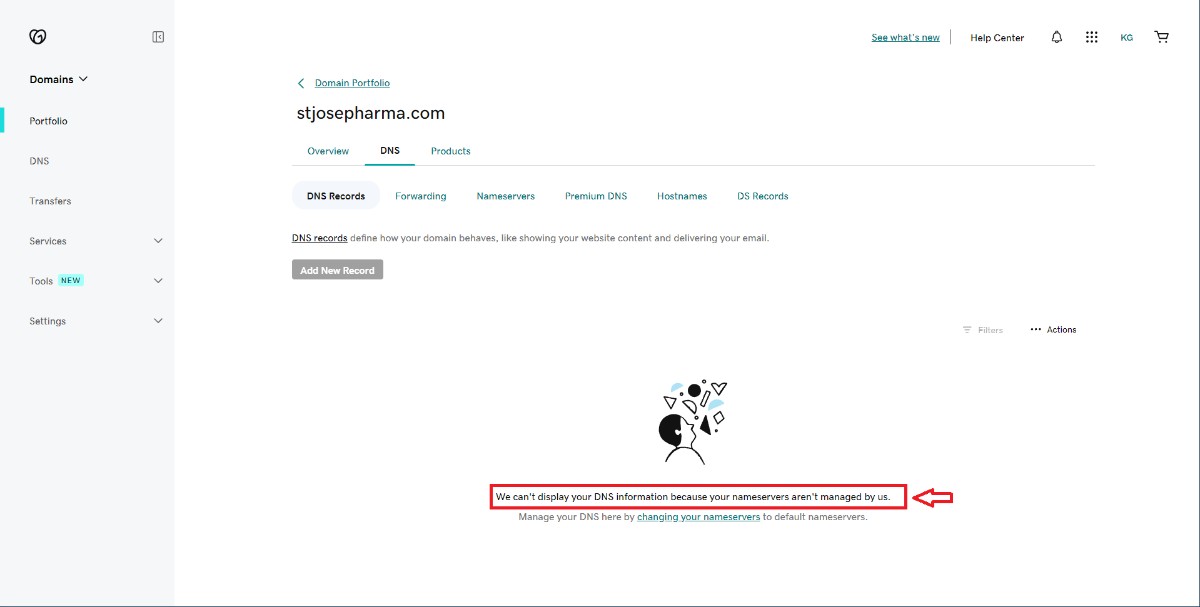
Occasionally domain records may be grayed out and unable to be edited (GoDaddy). This can be for multiple reasons. If you run into this problem This email address is being protected from spambots. You need JavaScript enabled to view it..
We will need to make DNS changes on each domain you want connected to your new website.
3. Try creating or editing a current DNS record
If you can make DNS changes on your domains then you are good to go! This email address is being protected from spambots. You need JavaScript enabled to view it. for the necessary DNS changes that will need to be made when you are ready to launch your new website.
Roadblocks:
If your domain uses custom nameservers your DNS records are managed outside your domain registrar.
We will need access to edit the DNS records on the custom nameservers to launch the new website. Usually, this means contacting the third party who managing them for you.
If we are unable to access the custom nameservers it is possible to lookup the existing records and recreate them in the domain registrar. The DNS record lookup tool is not 100% reliable and it is better to have a direct copy of the records to ensure nothing breaks.